Sunday, 21 January 2018

BitIo blog 11: PixelCraft 2.0


This code uses the Micro:bit as an interactive controller in Minecraft. You can read all about it in BitIO blog 1 here to fully understand how to set it up and run it. But suffice to say that the Brains behind it is David Whale. Over the course of the the last 5 months I have been integrating the Micro:bit into my Minecraft coding experiments.
This is the latest.... In a short summary this builds on blog 9 PixelCraft which was building on work done by Kari Lawler you can read about that here.  This updated edition will render the normal Pixelart with the press of the 'a' button, with the 'b' button you can render the same pixel art with random wool colours. The overall effect is a pop art style pixel art.

You can see for yourself below:

Below you can see a twitter video of this code working:


Picture of the various pixel art forms you can produce


Here is the code:


Alex Pixel art code
link
Pig Pixel art code
link
Steve Pixel art code
link

Enjoy,

Chris Penn.

If you like this blog check out all the others here

BitIO blog 10: Micro:bit transport


This code uses the Micro:bit as an interactive controller in Minecraft. You can read all about it in BitIO blog 1 here to fully understand how to set it up and run it. But suffice to say that the Brains behind it is David Whale. Over the course of the the last 5 months I have been integrating the Micro:bit into my Minecraft coding experiments. This is the latest.... In a short summary this allows you to create a TNT line of blocks and through the press of the 'a' button on the Micro:bit allows you to power the character along. If you press the 'b' button you can teleport back to your starting point. You can see for yourself below:

Below you can see a twitter video of this code working:


Picture of code working in Minecraft:


Here is the code:

link

Enjoy,

Chris Penn.

If you like this blog check out all the others here

EduBlocks for Micro:bit Blog 3: Random Names

Random names


Here is a simple random name generator................

Code

Hex: link
XML: link
Micropython: link

Enjoy!

Chris Penn
Blog 


If you like this blog check out all the others here

EduBlocks for Micro:bit blog 2: For loops

For Loops


Here are two simple examples of for loops ................

Basic for loop:

Hex: link
XML: link
Micropython: Link
More efficient for loop: 
Hex: link
XML:link

Micropython:link

Enjoy!

Chris Penn


If you like this blog check out all the others here

Tuesday, 16 January 2018

EduBlocks: Micro:bit blog 1, Variables, buttons and lists.


EduBlocks: Micro:bit blog 1, Variables, buttons and lists.

Simple Variable

With Loop


 Variables with button interaction


 List with button interaction


If you like this blog check out all the others here

Wednesday, 3 January 2018

BitIO blog 9: PixelCraft

First of all to you will need to read this blog about how to get started using BitIO(Made by David Whale).


This uses David Whale's BitIO library Python library for the Micro:bit. His library can be accessed from here:


The original worksheet code was created by Kari Lawler for her Leamington Raspberry Jam workshop in November. I have extended and modified bits accordingly. This is very much a joint effort.  

Below are the current Pixel Art that you can generate:

Steve

Alex 
Creeper 
Pig 
Storm Trooper 

Intro
The main aspect for me is finding new ways of teaching 2d arrays / lists. This is an excellent tool to do this. For now you can access three base versions:
  • Static (you run the Python script and it will render the Pixel Art in front of you.)
  • MB Button (basically the same Pixel Art triggered by pressing a button on the Micro:bit)
  • The MB Pin touched version(basically the same Pixel Art triggered by holding pin 0 and pin GND on the Micro:bit)
  • There is a fourth version which can be run as all three above which runs through all current Pixel Art objects in sequence and is accessible as static, button pressed and pin touched.

Scripts
Static Pixel Art scripts

Alex

Steve

Pig 

Creeper

Pixel Loop


Micro:bit button push scripts

Alex

Pixel Loop


Micro:bit Pins touched scripts

Alex


Pixel Loop


I will be coming back to this but for now this is a good enough start.

Enjoy,

Chris Penn.:)


If you like this blog check out all the others here

Thursday, 28 December 2017

Virtual Jam blog 3 / BitIO blog 8:Space themed Minecraft project ideas using the accelerometer


Space themed Virtual Jam / BitIO blog 8: 'Simple Space exploration with a Micro:bit'


As part of YorkPiJam's virtual Jam last weekend there was a Minecraft coding competition to go along side the any other project compeition, the theme this time is Space. Here are a couple of simple project ideas from students at my Schools Minecraft Pi club. First of all to you will need to read this blog about how to get started using BitIO(Made by David Whale).
http://warksjammy.blogspot.co.uk/2017/07/blog-1-getting-started-with-bitio.html


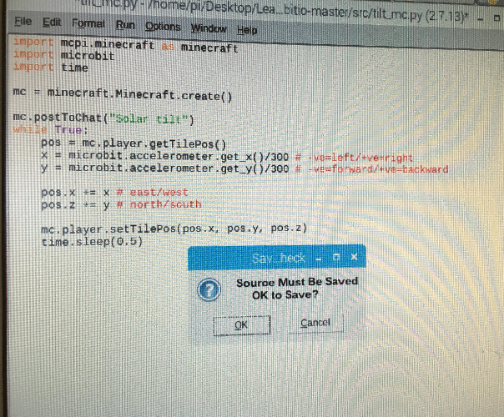
Both projects are based on one of the demos provided in David's demos. Students at my school have modified it slightly. The first project 'Solar Tilt' allows you t explore a simple representation of the Solar System by tilting the accelerometer. You can see a photo below. You will need to research and build this in Minecraft (Pi or Java version).


Micro:bit Solar tilt(modified by Adrian in year 9):

Screen shot in action:


Screenshot of code:


The second project 'Accelerometer Orbit'

This project uses essentially the same mechanics of the demo but drops a block on ecah movement which will allow you to create a cool looking orbit / ring around the object / planet that you build in Minecraft. Josh in year 7 built an alien for example. 

Screenshot of code in action:


Screen shot of code:

Both of these students have made minor modifiactions to David's base code but even with this there is unlimited potential you use the basic accelerometer example. Why not build a city and explore it.

Both these projects won prizes as part of @yorkpijam's virtual jam last weekend.


Enjoy,


Chris Penn.


....

If you like this blog check out all the others here