Sunday, 26 February 2017

EduBlocks Blog 1 getting started....


To install EduBlocks type in the following into  the following terminal on Raspberry Pi.

curl -sSL get.edublocks.org| bash 


In summary the new version you can easily save, load and switch between block mode and see the python version of the code. Furthermore you can save the python version of the code. Also you can easily stop the script when you are bored with running it by pressing Esc on the keyboard in summary. Its more awesome than it was before. Great work again Josh et al.

Here is the link to the new version cheat sheet:
https://t.co/rS6QT3HDts

Josh has developed with the help of others EduBlocks to try and bridge the gap between visual programming and textual programming in Python.

I came across this a few months ago and had an initial play and created some crude hacks using his drag and drop interface. These can be accessed here.

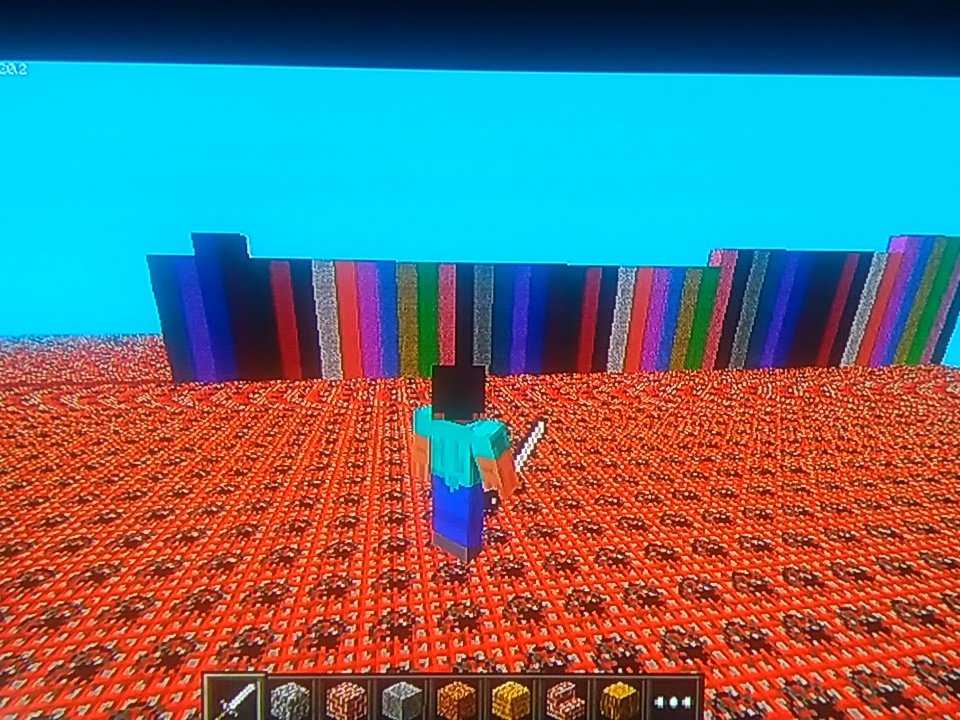
It runs in chromium browser on the Raspberry Pi. Here is an example of a script that I created that randomly drops active TNT squares in the sky.

You can install it on your Pi buy going on your browser and typing in : 

Based on what I have seen so far from this 13 year old lads creation is promising. Initially you could run a script and then struggled to easily stop it. 

Through the grape vine he is working has created a solution to this. In the first version you couldn't save / load your script now you can!!! thanks to the hard work and dedication of Josh. 

You can request additional functionality and it gets added. In summary his work in progress IDE is rapidly evolving into a great introduction IDE to Python coding. I will certainly be using it at future Jams. 

I look forward to seeing it develop further over the coming months. Great work Josh et al.

N.b. it works on all Pi's however from my experience Pi 2 and 3 are probably the optimum model to use.


If you like this blog check out all the others here

Tuesday, 21 February 2017

Leamington Raspberry Jam and 2017 .....

On Saturday  the latest Jam was held in Leamington Library. For the first time we used Microbits as to with Rasberry Pi's.

The first session was creating a traffic light using a single Neo pixel attached to a Microbit. It was coded using Micropython. The second session was using the Microbit as a trigger to start a traffic light sequence in Minecraft. Here is the link for the sheet that was: used https://github.com/ncscomputing/Hackpack/blob/Volume-5/Microbit%20Traffic%20lights.docx

It was really nice to see people turn up and enjoy themselves. Credit goes to the year 8 lad who traveled from Coventry who managed to combine both sessions into one complete solution. He clearly has the nack :). There was a year six student who attended who goes to the Code Club at the same venue. She said that her session was led by a man called Sam. So fair play to him for encouraging her to come along.

Next up is Minecraft Library Jam in May get your tickets here https://www.eventbrite.co.uk/e/minecraft-library-jam-coventry-central-library-tickets-32203062226

After that July's Jam at Nicholas Chamberlaine School and maybe a few more in between.  


If you like this blog check out all the others here

Tuesday, 24 January 2017

Your first explosive hack with minecraft and Python


The first place to start with python maybe hello chat/ world but the first really engaging one that people seem to enjoy is walking blocks. With the change of a block ID you can really alter the impact that block has in your world. The most obvious one that people always want to know is how to blow up TNT. Back in May I got bored and made this enjoy and go blow up some blocks.  

This video takes you through from start to .......... finish. 

Sunday, 22 January 2017

#Hackpack blog: MineGraph


How to create a real time graph using the sense hat emulator and Minecraft on Raspberry Pi


Firstly if you are just looking for the code: here it is https://raw.githubusercontent.com/ncscomputing/Hackpack/Volume-5/MinegraphSHEmuv1.py

Here is a straight copy of the code:

"""
Written by @ncscomputing v2 to work  with Pi Sense hat emulator on Pi not web based.
"""

import mcpi.minecraft as minecraft
import mcpi.block as block
import time
import random
from sense_emu import SenseHat

sense = SenseHat()

mc = minecraft.Minecraft.create()
orx,ory,orz = mc.player.getPos()

mc.postToChat("Start Graph")

blockTypeList=[35,45,3,4,5,6]
DataStreamList = []

DataStreamCount= 0

def BuildDataBlock():
    temp = int(sense.temp)
    DataStreamList.append(temp)
    orx,ory,orz = mc.player.getPos()
    block = random.choice(blockTypeList)

    for i in range (0,temp):
        x,y,z = mc.player.getPos()
        mc.setBlock(x,i,z,block)
    mc.player.setPos(orx,ory,orz+1)
    msg = "Temp currently is:",temp 
    print(msg)
        
while True:
    BuildDataBlock()
    time.sleep(4)


Here is a simple intro to how to get it to work:

  • It works with the sensehat emulator which is included by default on the Raspian OS. You can find it in Menu > Programming > Sense Emu.
  • Once that is loaded open Minecraft Pi which can be accessed Menu > Games > Minecraft
  • Create a new world and then using the space bar position the character up in the sky. If you press space down for about 5-6 seconds that should be high enough.
  • Open Python 3 Menu > Programming > Python3 and open the Python Code above and press F5
  • The code should then run.
  • It should start drawing bars as above. If you are not happy turn it off and retry. The temp is adjustable by the SenseHatEmu interface their is a temp slider adjust it up or down accordingly.
  • N.B. The code is not perfect but it does work last time I tested.
Enjoy :) Over

Chris Penn

If you like this blog check out all the others here

Thursday, 19 January 2017

Eagle Labs Raspberry Jam


When I saw on twitter last June / July that Barclays were opening an Eagle Lab in Birmingham(Les Pounder's retweet was the reason that I saw it :). I then asked them if they would follow the Cambridge Lab by having a Raspberry Jam?  they seemed open minded to the idea..... well in August we had the 1st Eagle Labs Jam about 18/9 people turned out in what is a super plush building smack bang next to Aston Uni in Birmingham.

At the 1st event I had help from the very kind Martin O' Hanlon, Spencer Organ and Scott Turner who kindly gave talks.

For the second event we had about 19 people again and Martin returned to hack with breadboards and stuff like this http://www.stuffaboutcode.com/2017/01/raspberry-pi-4-digit-7-segment-display.html
with a very keen chap from Leamington.

a famous box....


A massive thank you to the chap who traveled for 4 hours to come to an event I have organised, this was very humbling.

Stewart Watkiss aka Penguin tutor came with neopixels galore and a big thank you for your continued support in 2 recent Jams in August in Coventry.
Spencer Organ kindly ran his Festive Minecraft Python coding session with his Pi Top Ceeds in his travel suitcase most impressive indeed that arrangement. (For the record 6 ceeds).

Lastly there was even a bit of Pi Zero Retro Pie gaming going on.....

A massive thanks for all the help from Spencer and Stewart and Martin.  Plus Tim from Code Club for coming to. 

Many thanks to Barclays Eagle Labs for proving a free community space in an awesome building. 

See you all again for Eagle Labs Jam 3 later this summer. 

Over :)

Chris P
  
If you like this blog check out all the others here

Thursday, 31 March 2016

My slice of Pi

Over the past two years I have sunk a lot of time into all things Raspberry Pi in a bid to engage with concepts that dropped out of my brain in 2005 when I graduated. Why? well like most IT teachers I have noticed that the curriculum has changed a wee bit. Over the same sort of time period I have seemed to develop a bit of a niche for Minecraft programming and even host the odd Raspberry Jam or two. I have resisted to write any form of blog until now, My main reasoning behind this is to expand on the programs that I created as part of relearning to program in the #hackpack resources that I have curated. The booklets/ pdf's merely provide some plug and play instructions.

Here is the link to the #hackpack anthology:

https://github.com/ncscomputing/Hackpack/blob/master/Hackpack%20Anthology%20V1.1.pdf

Here are a few blog posts that I have written over the last year of playing with Raspberry Pi and Raspberry Jam.

Falling into Raspberry Pi ...... where it all started off guest post for Spencer Organ:

 http://home.uktechreviews.com/Raspberry/Pi%20blog/files/archive-january-2016.html

Tour the world with Minecraft and Python for Team Kano:

http://blog.kano.me/tour-the-world-with-minecraft-and-python/


If you like this blog check out all the others here